Cashier Guide
Overview
Section titled “Overview”The Cashier workspace (/point-of-sale/*) is the fullscreen point-of-sale interface for checkout lanes, delivered as Vendor Desktop on lane PCs or accessible via browser for store owners.
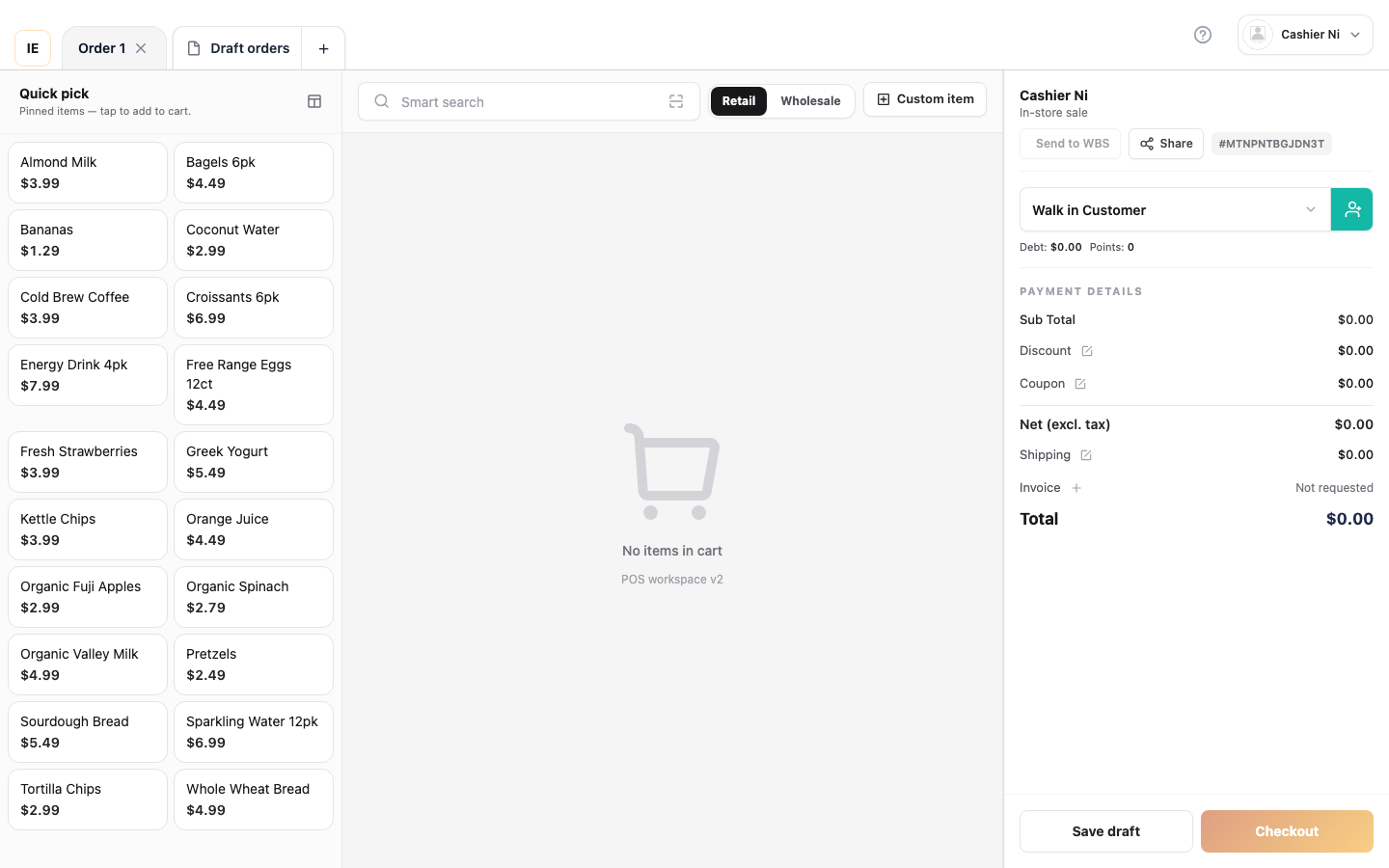
This guide covers:
- Getting started: Login, password recovery, store/lane selection, offline mode
- Daily operations: Sales, returns, orders, customers, reports
- Hardware setup: Receipt printers, card terminals, cash drawers, scales
- Settings: Store preferences, barcode labels, work shifts
Quick navigation
Section titled “Quick navigation”Getting Started — Sign in & first shift
Section titled “Getting Started — Sign in & first shift”- Cashier login — Employee sign-in on
/cashier-login⭐ - Forgot password — Cashier — Reset cashier password
- Forgot password — Owner/Employee — Shared dashboard flow
- Verify OTP — Enter the 6-digit code
- Reset password — Choose a new password
- Vendor login (Owner) — Owner sign-in
- Register an account — Create a new store
- Store, lane, and shift — Choose store and checkout lane
- First-open checklist — Pre-flight before going live
- Offline & local data — When the lane can keep selling offline
Daily Operations (Core Workflows)
Section titled “Daily Operations (Core Workflows)”- Sale workspace — Main selling interface with checkout ⭐
- Sale — cash — Walk-in cash sale
- Sale — with customer — Attach a customer & coupon
- Sale — card & terminal — Card payment via terminal
- Sale — customer debt — Credit a known customer
- Sale — drafts & tabs — Multi-cart workflow
- Sale — barcode scan — Fast entry via barcode
- Returns & refunds — Process returns and exchanges
- Orders list & detail — View order history and receipts
- Close work shift — End-of-shift cash count
Supporting Features
Section titled “Supporting Features”- Customers at POS — At-lane customer lookup
- Items catalog — Product search and stock check
- Warehouse board — Pick orders from warehouse 🆕
- Sales reports — Daily sales summary
- Barcode labels — Print product labels
Settings & Hardware
Section titled “Settings & Hardware”- Settings overview — Hardware and preferences overview
- Terminal payment — Payment terminal setup
- Receipt printer — Configure receipt printing
- Label printer, scale, drawer — Optional lane hardware
- Customer display & slideshow — Secondary screen
- Profile, language, store — Account & locale
- Reset local data — Desktop SQLite reset
Appendix
Section titled “Appendix”- Glossary — Cashier & POS terminology
- Other POS surfaces — Legacy
/posand dashboard entry
- FAQ index — All Cashier FAQs
- Auth & account FAQ — Login, password reset, owner vs cashier
- Sale & checkout FAQ — Stock, lane, payment errors
- Print & hardware FAQ — Printers, terminal, bridge
- Offline & sync FAQ — Outbox, drafts, cache
- Access & roles FAQ — Modules, 403, permissions
Who uses Cashier
Section titled “Who uses Cashier”| Role | Access | Typical use |
|---|---|---|
| Cashier | Vendor Desktop on lane PC, employee login | Process sales, handle returns, manage shift |
| Store manager | Browser or Desktop, owner login | Oversee operations, review reports, configure hardware |
| Back office | Dashboard /pos or create order page | Order entry, wholesale orders |
Architecture
Section titled “Architecture”Routes
Section titled “Routes”| Path | Purpose |
|---|---|
/point-of-sale/sale | Main selling workspace |
/point-of-sale/orders | Order history |
/point-of-sale/returns | Return/refund orders |
/point-of-sale/customers | Customer lookup |
/point-of-sale/items | Active catalog |
/point-of-sale/report | Sales summary |
/point-of-sale/work-shift | Shift management |
/point-of-sale/barcode | Barcode label workbench |
/point-of-sale/settings | Hardware & preferences |
Sign-in routes (this guide)
Section titled “Sign-in routes (this guide)”| Path | Who | Landing after sign-in |
|---|---|---|
/cashier-login | Employee only | /point-of-sale/sale (POS) |
/cashier-login/forgot-password | Employee only | /verify-otp |
/login | Employee | /dashboard |
/vendor-login | Owner | /dashboard |
/forgot-password[?type=…] | Owner / Employee | /verify-otp |
/verify-otp | From reset flow | /reset-password |
/reset-password | From reset flow | back to original sign-in |
/register | New owner | /vendor-login |
API endpoints
Section titled “API endpoints”Base: /vendor/point-of-sale/
Key endpoints:
GET /items/grouped— Catalog (requiresstore_id)GET /customers— Customer searchPOST /orders— Place orderPOST /apply-coupon— Apply promotionGET /promotions— Active discounts
All endpoints require store_id and vendor authentication.
Technical stack
Section titled “Technical stack”- Framework: React 19 + React Router 7 + Vite
- State: Zustand for UI state, TanStack Query for server data
- Offline: IndexedDB + local SQLite (Electron), outbox pattern for order sync
- Forms: React Hook Form + Zod validation
- UI: Lion POS design system (dark slate theme)
- i18n: English + Vietnamese via
react-i18next
Next steps
Section titled “Next steps”Vietnamese
Section titled “Vietnamese”Bản tiếng Việt đầy đủ: Trung tâm trợ giúp Thu ngân.