Sales Reports
Overview
Section titled “Overview”The Report page (/point-of-sale/report) provides a lane-level sales summary with filters by date, staff, and shift. Shows orders, revenue, payment breakdowns, and shift close workflow.
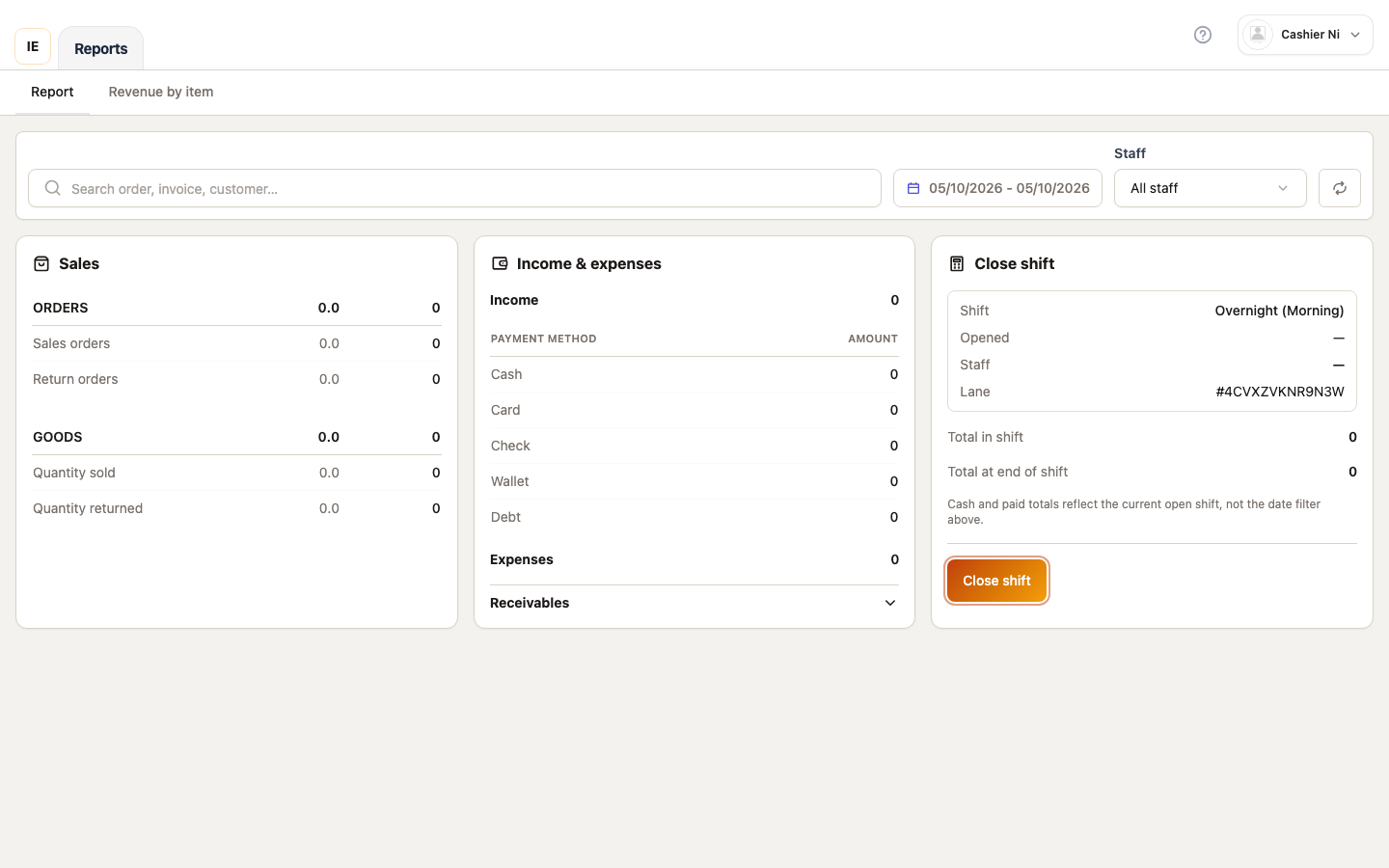
Page layout
Section titled “Page layout”┌──────────────────────────────────────────────────────────┐│ Offline notice (if applicable) │├──────────────────────────────────────────────────────────┤│ Filter toolbar: Date range | Staff | Refresh | Reset │├──────────────────────────────────────────────────────────┤│ Three-column grid: ││ ┌─────────────┬─────────────┬─────────────┐ ││ │ Sales │ Cashflow │ Handover │ ││ │ - Orders │ - Income │ - Open shift│ ││ │ - Returns │ - By method │ - Totals │ ││ │ - Goods │ - Expenses │ - Close btn │ ││ └─────────────┴─────────────┴─────────────┘ │└──────────────────────────────────────────────────────────┘Filter toolbar
Section titled “Filter toolbar”Date range picker
Section titled “Date range picker”Default: Today only (midnight to midnight in store timezone)
Custom range:
- Click date button → Calendar dropdown opens
- Select start date (
from) - Select end date (
to) - Range applies to all stats
Timezone handling:
- Uses store’s configured timezone (
dashboard_prefs.timezone) - Converts browser date to YMD in store zone
- API receives
date_from,date_to,timezoneparams
Staff filter
Section titled “Staff filter”Options:
- All employees: Orders from all staff
- Cashier only: POS-created orders only (excludes admin/wholesale)
Default: All employees
Requires pos_staff_only=true API param when “Cashier only” selected.
Search input
Section titled “Search input”Searches orders within date range by:
- Order number
- Customer name
- Product name
Debounced 350ms, updates all cards when query changes.
Refresh button
Section titled “Refresh button”Circular arrow icon — refetches:
- Report summary (
/vendor/point-of-sale/report/summary) - Current open shift (if any)
- Shift totals
Reset button
Section titled “Reset button”Clears all filters:
- Date range → Today
- Staff filter → All
- Search → Empty
Sales card
Section titled “Sales card”Section: Orders
| Metric | Description |
|---|---|
| Sales orders | Count + amount of completed orders |
| Return orders | Count + amount of returns (negative) |
Section: Goods
| Metric | Description |
|---|---|
| Qty sold | Sum of line quantities (positive sales) |
| Goods sold amount | Revenue from sold goods |
| Qty returned | Sum of returned quantities (negative) |
| Goods returned amount | Refunded amount |
All amounts formatted as currency with separators.
Cashflow card
Section titled “Cashflow card”Income section
Shows total income with breakdown by payment method:
| Method | Shows |
|---|---|
| Cash | Cash payments received |
| Card | Terminal + manual card entries |
| Bank Transfer | Manual bank transfer tracking |
| E-wallet | Mobile payment methods |
| Customer Debt | Billed to customer accounts |
Income total = sum of all payment methods (excludes returns).
Expense section
Shows total expenses (manual expense entries, not automated).
Debt section (expandable)
Collapsible section showing:
- Outstanding debt owed to store
- Debt collected
- New debt issued
Click section header to expand/collapse.
Handover card
Section titled “Handover card”Purpose: Track shift totals and close handover between cashiers.
Open shift display
Section titled “Open shift display”If current user has open shift, shows:
- Shift label: e.g., “Morning shift”, “Lane 1”
- Opened at: Timestamp (formatted with date-fns)
- Staff: Employee who opened shift
- Lane: POS register label (if multi-lane)
Shift totals
Section titled “Shift totals”Total in shift:
- Cash collected during shift
- Updates in real-time as orders placed
- Source:
order_stats.cash_totalfrom shift detail API
Total end shift:
- All payments (cash + card + other) during shift
- Source:
order_stats.total_amountfrom shift detail
Loading states
Section titled “Loading states”“Loading shift totals” appears when:
- Shift exists but detail query pending
- Offline and cannot fetch shift data
Unavailable state:
- Offline and shift detail failed to load
- Shows ”—” for totals
- Amber text: “Shift totals unavailable offline”
Close shift button
Section titled “Close shift button”Conditions to show:
- Work shifts enabled in store config
- Current user has open shift
- Not loading shift detail
Click behavior:
- Opens Close Shift Modal (shared component from Dashboard)
- Shows shift totals, expected cash, actual cash input
- Variance calculation (expected - actual)
- Confirm → Closes shift, navigates back to report
After close:
- Shift no longer appears in “Open shift” section
- Can open new shift from Work Shift page
No open shift state
Section titled “No open shift state”If work shifts enabled but no open shift:
- Shows message: “No open shift for this lane”
- User must open shift from Work Shift page before processing sales
Date range totals (no open shift)
Section titled “Date range totals (no open shift)”When viewing historical date range (not live shift):
- “Total in shift” shows cash for date range
- “Total end shift” shows all payments for date range
- These are not tied to a specific shift
- Footer hint: “Totals based on date range, not current shift”
Offline behavior (Desktop)
Section titled “Offline behavior (Desktop)”Offline banner
Section titled “Offline banner”Amber banner at top when offline:
- “Report unavailable offline — last known data shown”
- Or: “Cannot load report data”
Stale data
Section titled “Stale data”Report attempts stale-while-revalidate but may fail:
- Shows cached data if available
- Error state if no cache
Shift close blocked
Section titled “Shift close blocked”Cannot close shift when offline:
- Close button disabled
- Tooltip: “Shift close requires internet connection”
Work shift integration
Section titled “Work shift integration”When shifts are enabled
Section titled “When shifts are enabled”Store configuration flag: enableWorkShift = true
Effect:
- Handover card shows open shift section
- Report can filter by shift-scoped data
- Orders tagged with
work_shift_id
When shifts are disabled
Section titled “When shifts are disabled”Configuration flag: enableWorkShift = false
Effect:
- Handover card shows date range totals only
- No shift open/close workflow
- Orders not tagged with shift ID
Timezone handling
Section titled “Timezone handling”All date filters converted to store timezone via:
usePosStoreTimezone(storeId)hook- Returns IANA timezone from
dashboard_prefs.timezone - Fallback: Browser timezone → UTC
API receives:
date_from: “YYYY-MM-DD” in store zonedate_to: “YYYY-MM-DD” in store zonetimezone: IANA string (e.g., “America/Los_Angeles”)
Refresh behavior
Section titled “Refresh behavior”Auto-refresh: None (must manually refresh)
On refresh:
- Fetches latest report summary
- Fetches current open shift (if any)
- Fetches shift detail (if open shift exists)
- Updates all cards simultaneously
Toast message: “Report refreshed” after successful fetch.
Error states
Section titled “Error states”Load error banner
Section titled “Load error banner”Red banner appears if report fetch fails:
- Shows error message from API
- Or fallback: “Could not load report”
- Retry by clicking Refresh
Shift totals error
Section titled “Shift totals error”If shift detail fails:
- Totals show ”—”
- Amber text: “Shift totals unavailable”
- Does not block close shift (uses report summary instead)