Roles and permissions
What is a role?
Section titled “What is a role?”A role is a bundle of permissions that an employee gets when assigned to it. Roles live at the store level — one store can have many roles.
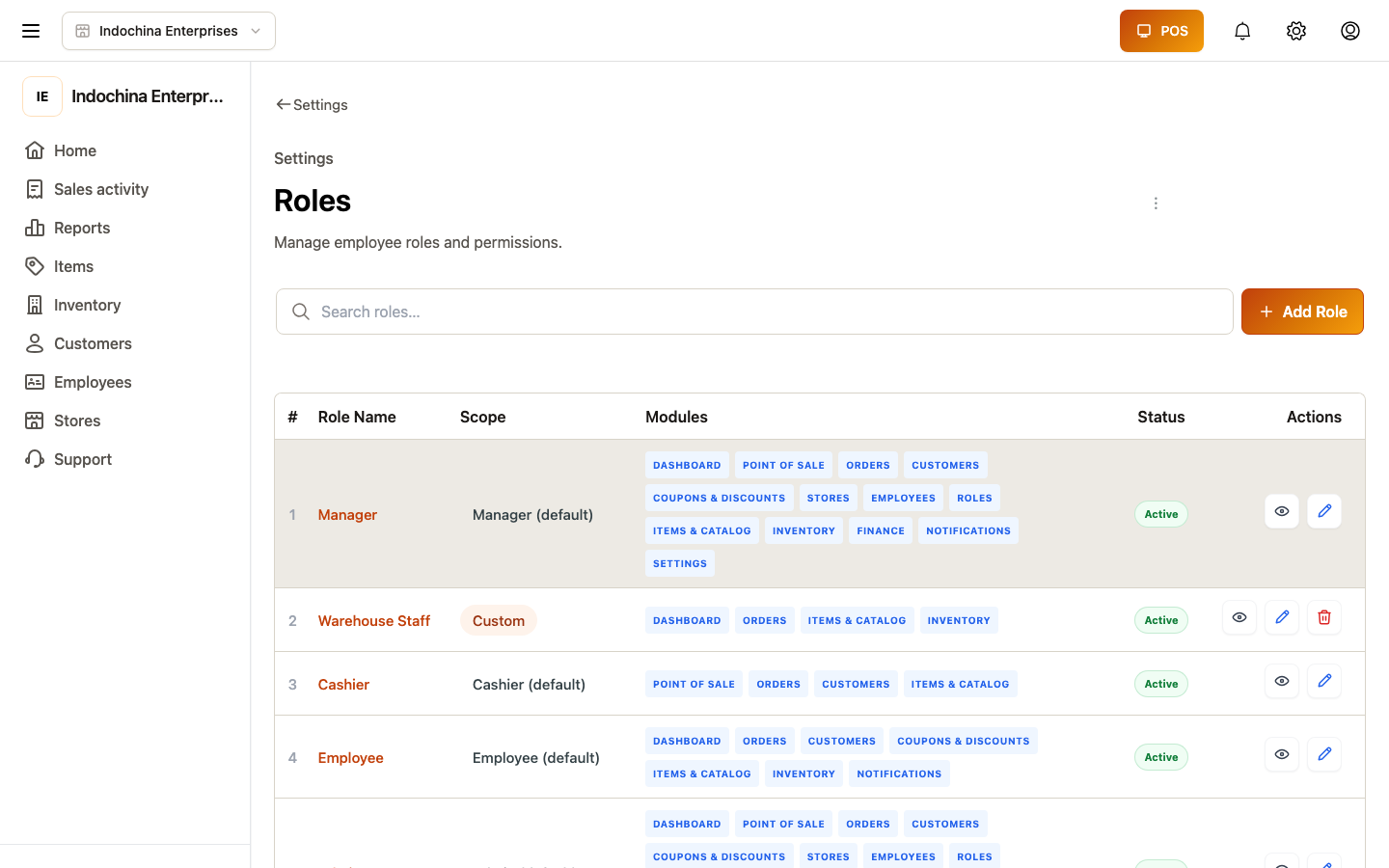
- Presets come with every store: Admin, Manager, Employee, Cashier.
- Custom roles — owners create them when presets don’t fit.
You can tune presets (add / remove modules) but cannot delete them.
Modules and levels
Section titled “Modules and levels”Each module controls access to one feature area. Levels are:
| Level | What it lets you do |
|---|---|
| None | No access — the menu / page is hidden / blocked. |
| Read | View only. Cannot create, edit, or delete. |
| Write | Create and edit. Most day-to-day users want this. |
| Manager | Full CRUD — also delete and reassign. Required for staff management. |
Modules you’ll see in the role editor
Section titled “Modules you’ll see in the role editor”| Module | Lets you access |
|---|---|
dashboard | Home page, KPIs. |
order | Orders list, create order, work shifts, deliveries. |
pos | Fullscreen POS lane and POS workspace. |
product | Catalog (products, categories, units, attributes, tags, suppliers, gallery). |
inventory | Warehouses, stocks, lots, adjustments, transfers. |
customer | Customers and categories. |
coupon | Discounts / coupons. |
finance | Sales reports, refunds, transactions, expenses, receivables. |
store | Store list and configuration. |
employee | Employees / staff management. |
settings | Notifications, devices, terminal, shift templates. |
role | Roles editor (owners only). |
notification | Messages to staff. |
If a module is None, the link in the sidebar is hidden — but bookmarked URLs still hit the access gate, so don’t share links an employee can’t open.
What the presets give you
Section titled “What the presets give you”| Preset | Highlights |
|---|---|
| Admin | Every module write or manager. Can’t edit roles itself. |
| Manager | Orders / inventory / customers / finance manager; employee manager so they can CRUD staff; product.view_cost capability. |
| Employee | POS, orders, basic inventory, customers read. |
| Cashier | Lane only — pos write, plus order / product / customer read so the cashier can browse and look up. |
Tip for owners: start with Manager for supervisors, Employee for part-timers, and Cashier for lane-only staff. Reserve Admin for yourself / a co-owner.
Edit a role
Section titled “Edit a role”- Owner opens Roles → picks a row.
- Edit to add or remove modules / change level.
- Save. Employees pick up the change on next sign-in or token refresh.
Removing a module hides the link the moment the page reloads — they won’t lose data, they just can’t open the screen anymore.
Common questions
Section titled “Common questions”Employee still sees the old role after I change it. They need to reload the page or sign out / sign in. The change applies on the next token refresh.
Removing pos write broke my cashier. Yes — without pos write they can’t open the sale screen. Put pos back to Write for cashiers.
A preset has a level I don’t want. Open the preset, switch to None (or any level you prefer) on the specific module, save. Presets are templates — they can be tuned.
I want one employee to view cost and another not to. Make two custom roles: one with product.view_cost, one without. The view_cost is a capability granted via product’s manager level.
Related
Section titled “Related”- Employees and stores — assigning roles to people.
- POS / Checkout — what cashiers see.