Customers
Overview
Section titled “Overview”The Customers page (/point-of-sale/customers) provides customer lookup and management at the lane, including loyalty points, membership status, and quick customer creation.
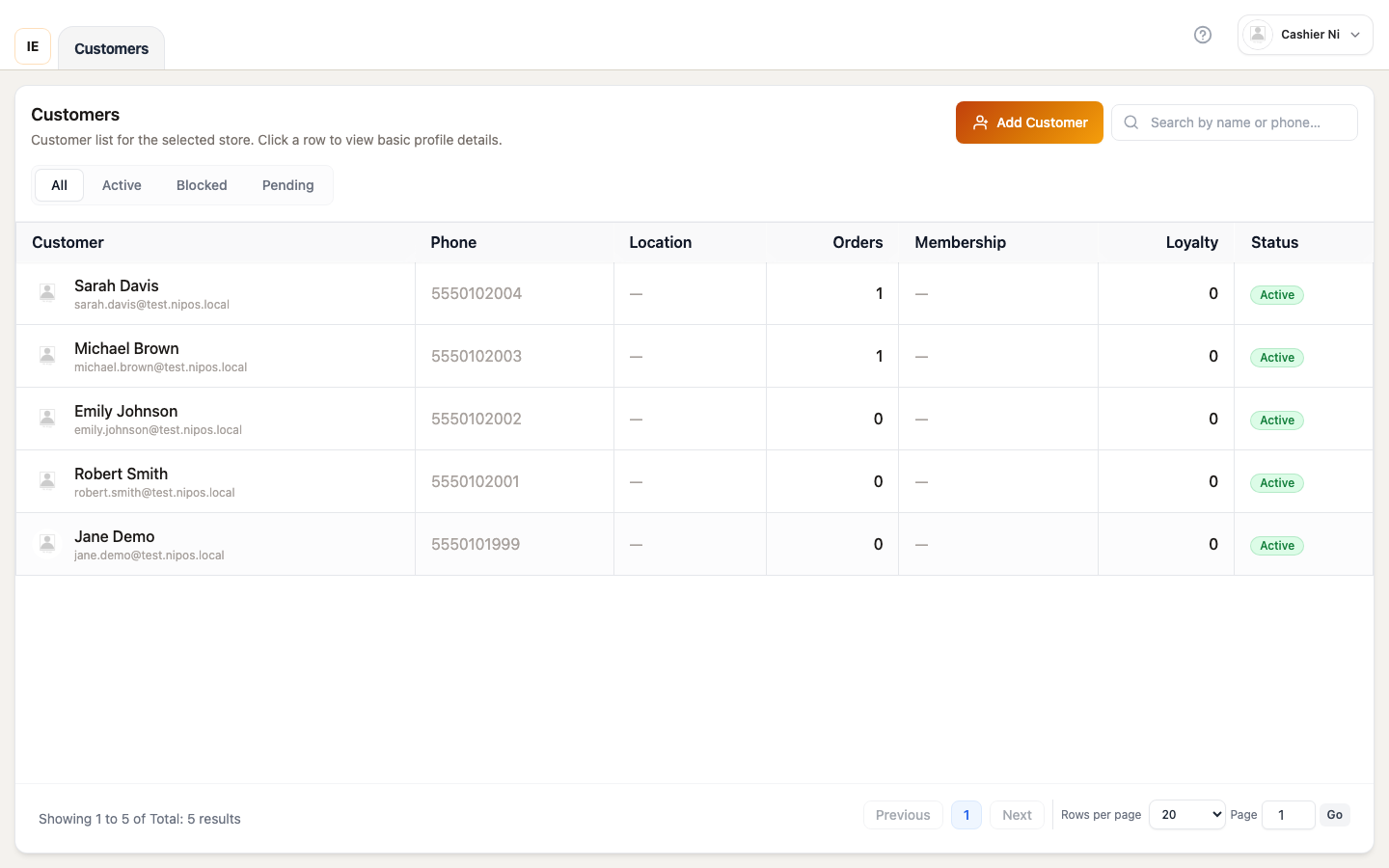
Page layout
Section titled “Page layout”┌──────────────────────────────────────────────────────────┐│ Add customer | Search | Sync catalog │├──────────────────────────────────────────────────────────┤│ Status tabs: All | Active | Blocked | Pending │├──────────────────────────────────────────────────────────┤│ Customers table ││ - Avatar | Name | Email | Phone | Location ││ - Orders | Membership | Loyalty points | Revenue ││ - Status badge │└──────────────────────────────────────────────────────────┘Toolbar
Section titled “Toolbar”Add customer button
Section titled “Add customer button”Opens customer creation modal:
- Click “Add customer” (blue button with user-add icon)
- Fill form:
- Name (required)
- Email (optional, must be unique if provided)
- Phone (optional)
- Address fields
- Retail login (optional — enables customer portal access)
- Submit → Customer created, appears in list
Search input
Section titled “Search input”- Searches: Name, email, phone
- Debounced 350ms
- Clears on focus loss if empty
- Matches partial strings (case-insensitive)
Sync catalog (Desktop)
Section titled “Sync catalog (Desktop)”Force refresh customer data from server:
- Click sync icon → fetches latest customer list
- Background sync runs automatically when online
Status tabs
Section titled “Status tabs”| Tab | Shows |
|---|---|
| All | All customers regardless of status |
| Active | status = "active" — can place orders |
| Blocked | status = "blocked" — cannot place orders (debt, fraud, etc.) |
| Pending | status = "pending" — awaiting approval or verification |
Click tab to filter, selection persists in URL param ?tab=<status>.
Customers table
Section titled “Customers table”Columns
Section titled “Columns”| Column | Content | Notes |
|---|---|---|
| Customer | Avatar + name + email | Avatar uses fallback generator if no image |
| Phone | Contact phone | Shows ”—” if empty |
| Location | Address/city | Simplified display |
| Orders | Order count | Lifetime total |
| Membership | Membership tier name | ”—” if none |
| Loyalty | Points balance | Formatted as whole number |
| Revenue | Total spent | Only visible if allowViewCustomerRevenue = true in store config |
| Status | Status badge | Colored pill (green=active, red=blocked, yellow=pending) |
Revenue column visibility
Section titled “Revenue column visibility”Revenue column appears only when store configuration enables allowViewCustomerRevenue:
- Enabled: Shows total customer spending (formatted currency)
- Disabled: Column hidden entirely
Controlled by storeConfigurationPosFlagsFromSnapshot(configuration).allowViewCustomerRevenue.
Row click
Section titled “Row click”Opens customer detail modal showing:
- Full contact info
- Order history summary
- Loyalty points + membership details
- Revenue (if enabled)
- Recent orders (last 5)
Modal is read-only in POS workspace. To edit customer, must use Dashboard → Customers.
Customer detail modal
Section titled “Customer detail modal”Information sections
Section titled “Information sections”Profile:
- Name, email, phone
- Address (full)
- Date created
- Customer ID (for support)
Loyalty & Membership:
- Current points balance
- Points earned / redeemed
- Active membership tier
- Membership expiry (if applicable)
Order stats:
- Total orders
- Total spent (if revenue visible)
- Average order value
- Last order date
Recent orders (expandable):
- Last 5 orders with date, total, status
- Click order → closes modal, opens order detail
Actions in modal
Section titled “Actions in modal”- Close — Dismiss modal
- View full history — Navigate to Dashboard → Customers → Detail (if user has permission)
Customer creation modal
Section titled “Customer creation modal”Form fields
Section titled “Form fields”Required:
- Name: Full customer name
- Store: Pre-filled with selected store (locked for employees)
Optional:
- Email: Must be unique across system
- Phone: Mobile or landline
- Address: Street, city, district, country
- Notes: Internal notes (not visible to customer)
- Retail login: Checkbox to enable customer portal access (requires email)
Retail login option
Section titled “Retail login option”When enabled (enableOptionalRetailLogin = true):
- Creates customer account on retail portal
- Customer can view orders, loyalty points
- Sends email invite with temporary password
On submit
Section titled “On submit”- Validates form (Zod schema)
- API call:
POST /vendor/customerswithstore_id - Success → Toast message, modal closes, table refreshes
- Error → Shows validation errors inline
Pagination
Section titled “Pagination”- Default page size: 10 rows
- Options: 10, 20, 50, 100
- Jump to page: Type page number, press Enter
- Total: Shows “X customers” at bottom
Pagination resets to page 1 when:
- Search query changes
- Status tab changes
- Page size changes
Offline behavior (Desktop)
Section titled “Offline behavior (Desktop)”Stale-while-revalidate
Section titled “Stale-while-revalidate”- Shows cached customer data immediately (if available)
- Fetches fresh data in background
- Merges fresh data when ready
Cache source
Section titled “Cache source”Customers cached in:
- Browser: IndexedDB (
POS_LOCAL_CATALOG_CACHE_KEYS.customers) - Desktop: SQLite local database
Cache key: customers-<storeId>
Offline indicator
Section titled “Offline indicator”When offline, amber banner appears:
- “Viewing cached customer data (offline)”
- Data may be stale if not recently synced
Linking customer to order
Section titled “Linking customer to order”From sale workspace, select customer before checkout:
- Click “Select customer” in top toolbar
- Customer search modal opens (same component as this page)
- Search and select customer
- Customer linked to current cart
- On checkout, order associates with customer
Benefits of linking:
- Loyalty points: Auto-applied, earn/redeem
- Membership discounts: Applied if customer has active membership
- Order history: Order appears in customer’s history
- Debt tracking: If customer has credit terms
Store configuration flags
Section titled “Store configuration flags”| Flag | Effect |
|---|---|
allowViewCustomerRevenue | Shows/hides Revenue column in table |
enableRetailLogin | Shows retail login checkbox in creation modal |
Flags read from vendor_store_configuration via storeConfigurationPosFlagsFromSnapshot().
Troubleshooting
Section titled “Troubleshooting”Cannot add customer
Section titled “Cannot add customer”Missing permissions: Requires customer write
Solution: Contact owner to grant permission
Customer not appearing in search
Section titled “Customer not appearing in search”Cache stale: Click sync button to refresh Wrong store: Customer belongs to different store
Revenue column missing
Section titled “Revenue column missing”Not an issue: Column hidden intentionally if store owner disabled allowViewCustomerRevenue